
Exporting Bookings with RentalWise
At RentalWise we’re not just experts in the short-term rental (STR) industry—we’re homeowners ourselves, with years of hands-on experience in managing properties. We know how critical it is to have a clear, comprehensive breakdown of your booking data, whether it’s for a single season or years of reservations. That’s why we’ve designed our CRM to make exporting bookings effortless, delivering all the information you need in a single, easy-to-use file. In this article, we’ll guide you through the process of exporting bookings in RentalWise , highlight key features, share tips for focused exports, and explain some lesser-known fields to ensure you get the most out of our platform. Let’s dive into smarter booking management!
Why Export Bookings with RentalWise?
Our booking export feature is crafted to save you time and provide actionable insights into your short-term rental business. With 39 fields of data, including property details, guest information, and payment statuses, our platform ensures you have everything you need at your fingertips. Whether you’re analyzing performance, preparing for tax season, or sharing data with your team, our export tool integrates seamlessly with our channel manager to keep your operations running smoothly.
Key benefits include:
Comprehensive Data: Access all relevant booking details, from property info to financials, in one Excel (.xlsx) file.
Customizable Exports: Use filters to focus on specific properties, channels, or timeframes for targeted insights.
User-Friendly Design: No tech expertise required—just a few clicks to download your data.
Seamless Integration: Works with your existing OTA connections (e.g., Airbnb, Booking.com) and iCal syncs.
How to Export Bookings in RentalWise
Exporting bookings is quick and intuitive with our platform. Whether you want a complete history or a filtered dataset, we’ve got you covered. Here’s how to do it:
Exporting All Bookings
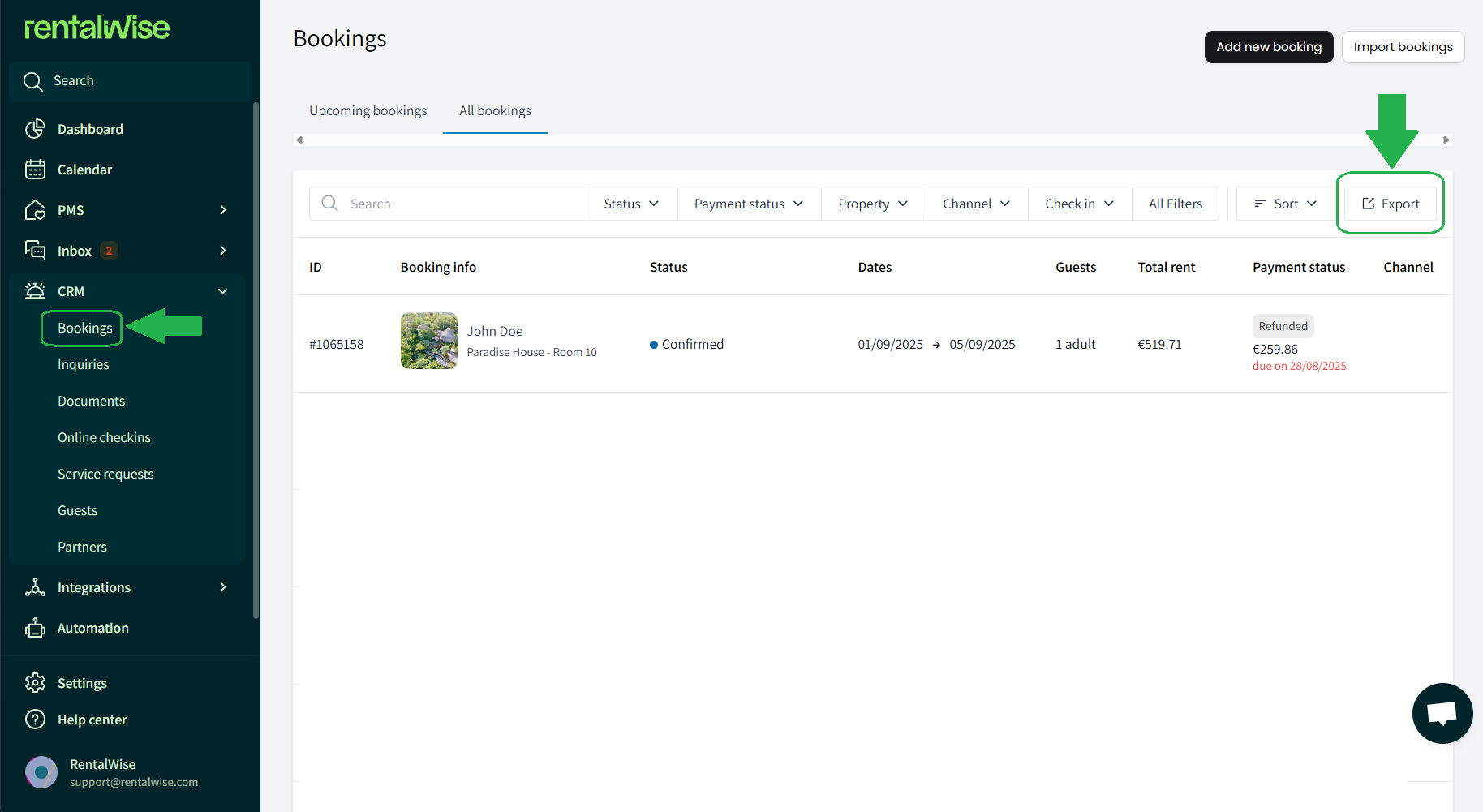
1. Navigate to the CRM Module in your RentalWise dashboard.
2. Go to Bookings and select All Bookings.
3. Click the Export button to download an Excel (.xlsx) file containing all your bookings, complete with 39 fields, including:
Property Information (e.g., property name, location)
Internal ID (unique booking identifier)
Guest Information (name, contact details)
Accommodation-Related Financials (total cost, fees)
Payment Status (e.g., paid, pending, refunded)
And much more!
This method is perfect for a full overview of your booking history with RentalWise.
Creating a Focused Export
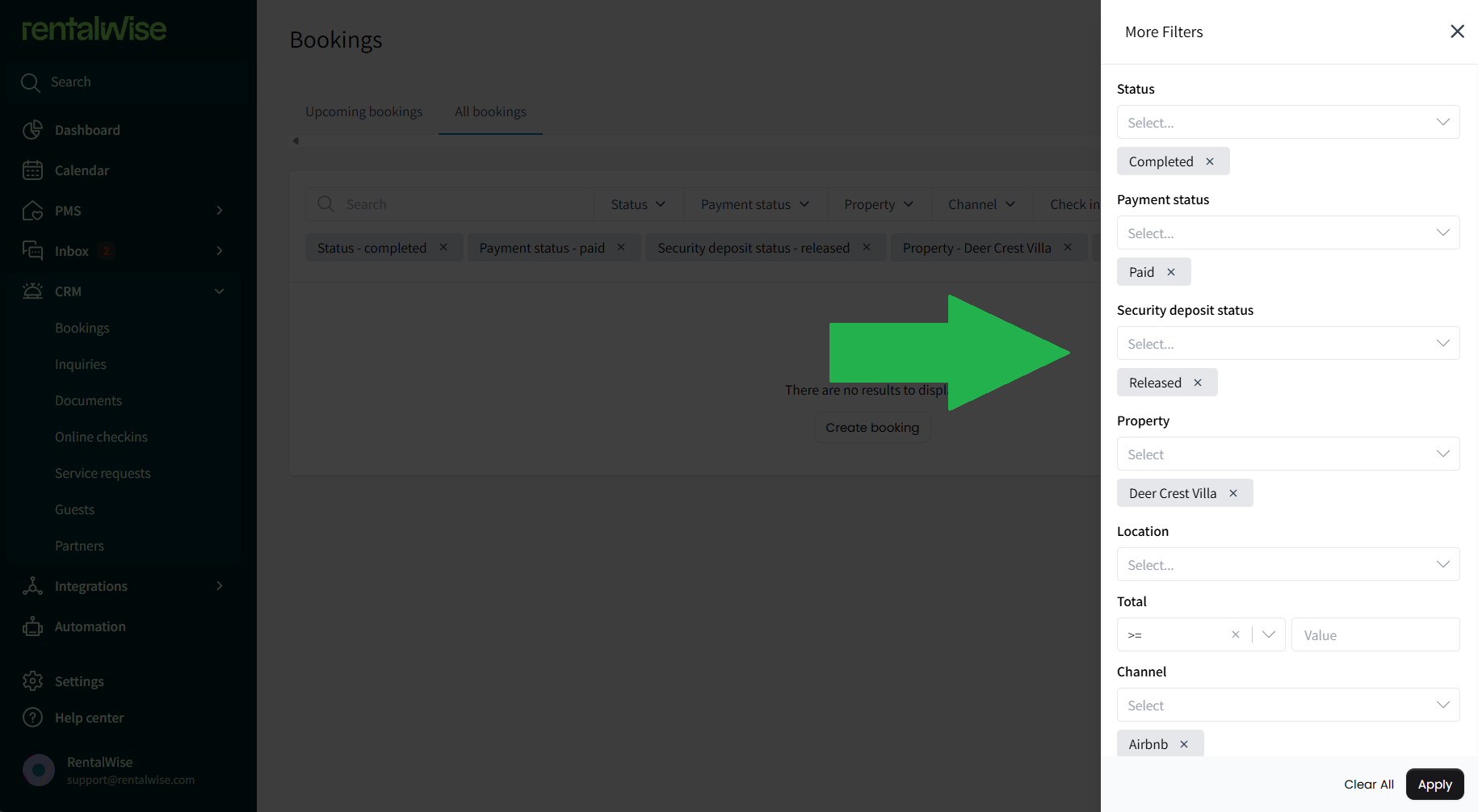
For more specific data, use our powerful filtering options to tailor your export. For example, let’s say you want to export all completed and checked-out bookings from Airbnb for a specific property, fully paid:
1. In the All Bookings section, click All Filters.
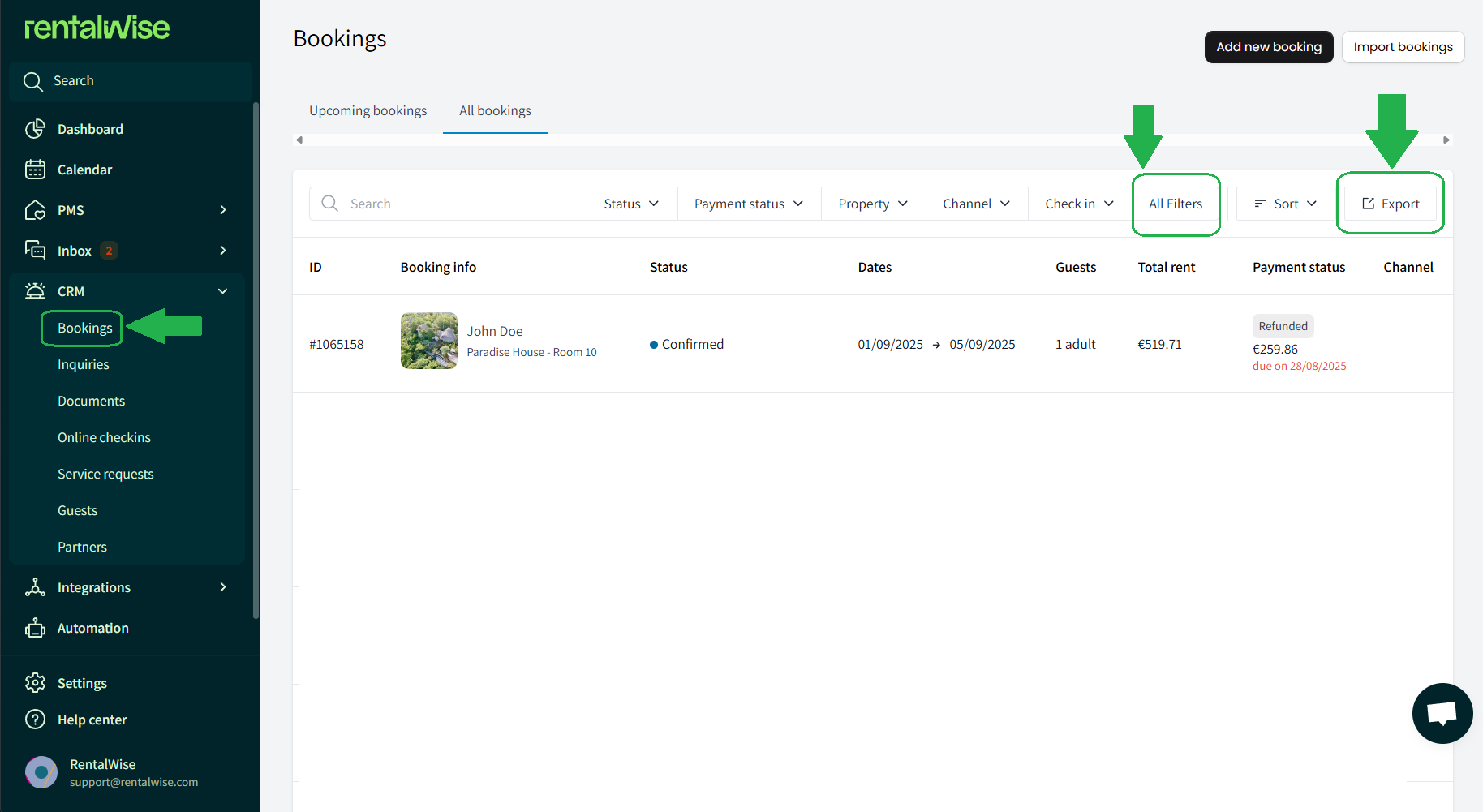
2. Set your filters:
Property: Select the specific property.
Channel: Choose Airbnb.
Status: Select “Completed” and “Checked Out.”
Payment Status: Choose “Paid in Full.”
3. Click Export to download a filtered Excel file with only the data you need.
This focused approach helps you analyze specific trends, such as performance on a single OTA or property, without sifting through irrelevant data.
Understanding Key Export Fields
Some fields in the export might not be immediately obvious, especially for manual bookings or non-API integrations. Here’s a breakdown of less intuitive fields to help you make sense of your data:
Booker: Refers to an internal team member who manually created a booking (e.g., for a phone reservation). Select a team member in this field to track bookings they’ve entered, ensuring accountability and clarity.
Source: A customizable field for internal notes about how a booking was made. For example, you can note “Booking made via a call” or “Special request via email” to track direct or unique bookings.
External ID: Used for manual bookings tied to non-API platforms (e.g., PlumGuide). If you sync availability via iCal (which only shares availability, not rates or bookings), you can manually create a booking in our software and input the external platform’s booking ID (e.g., PlumGuide’s internal ID) in this field, along with the Source set to “PlumGuide.” This ensures your export reflects accurate channel data.
These fields make our software flexible for both automated and manual workflows, especially when dealing with platforms that rely on iCal syncing.
Key Tips for Exporting Bookings
To maximize the value of your booking exports, keep these points in mind:
Financial Data: All relevant financial information (e.g., total booking amount, fees, payment status) is included in the export. For advanced reporting or tax accounting, we recommend pairing our exports with specialized accounting software.
Credit Card Privacy: For security, exports do not include guests’ credit card details used for payments.
Filter Strategically: Use filters to focus on high-priority data, such as bookings from a specific channel or time period, to streamline analysis.
Regular Exports: Schedule periodic exports to monitor trends, track performance, or prepare for financial audits.
By leveraging these tips, you’ll turn raw booking data into actionable insights for your short-term rental business.