
If you are a Homeowner or Property Management Company (PMC) handling Pre-Authorizations (commonly referred to as Security Deposits), there are several important aspects you should be aware of to ensure a smooth process.
RentalWise provides a simple yet powerful way to secure your properties and manage deposits — all while keeping you informed of every status change.
📩 Note: You will automatically receive an email notification for any change in the Security Deposit status within a booking — whether it’s successful or failed
⚙ How to Configure Security Deposits
Here’s a quick overview of how to set up and manage your Security Deposit in RentalWise:
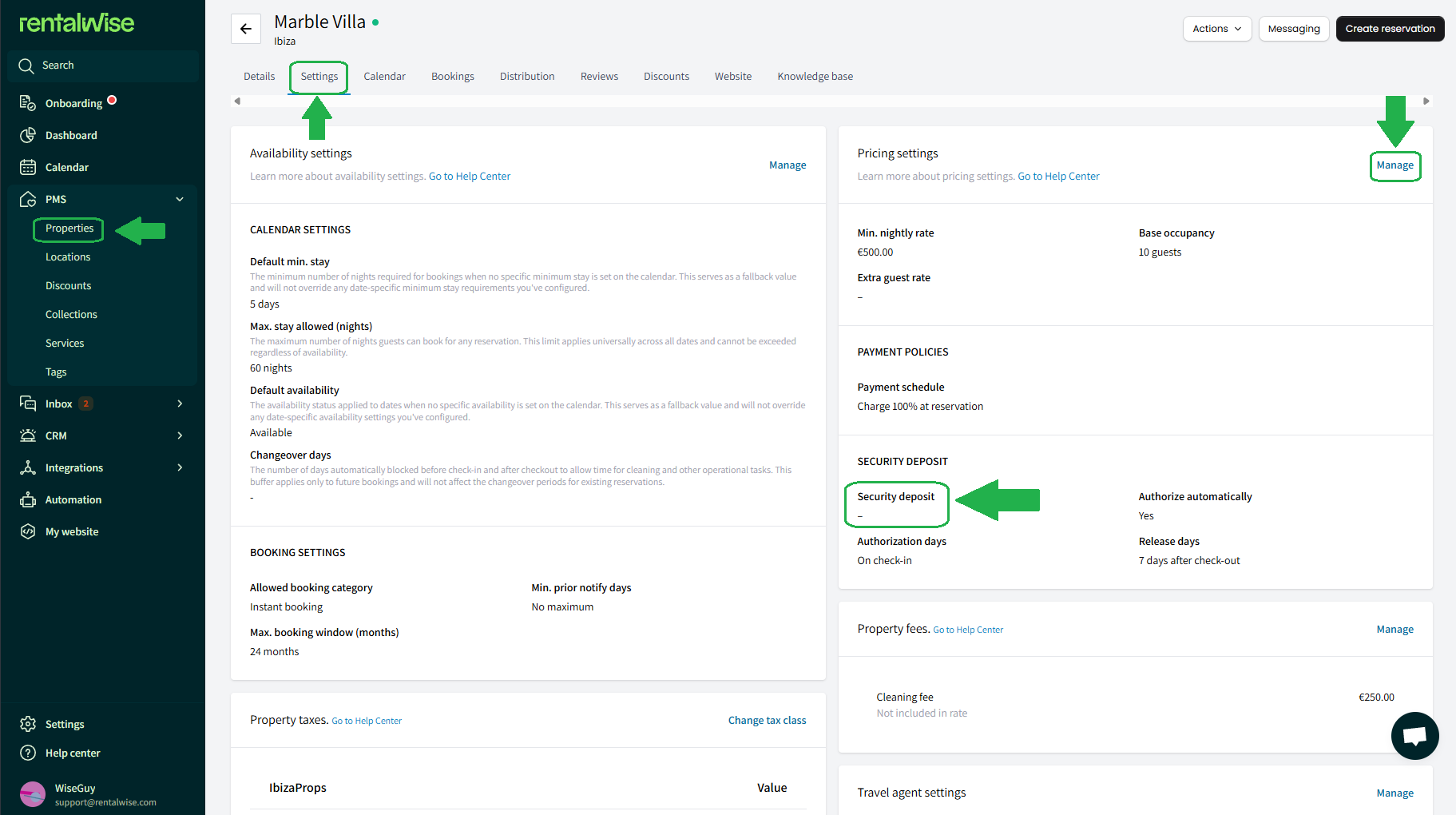
Configure at the Property Level
Go to PMS → Property → Settings and set your desired Security Deposit amount.
Control Authorization Method
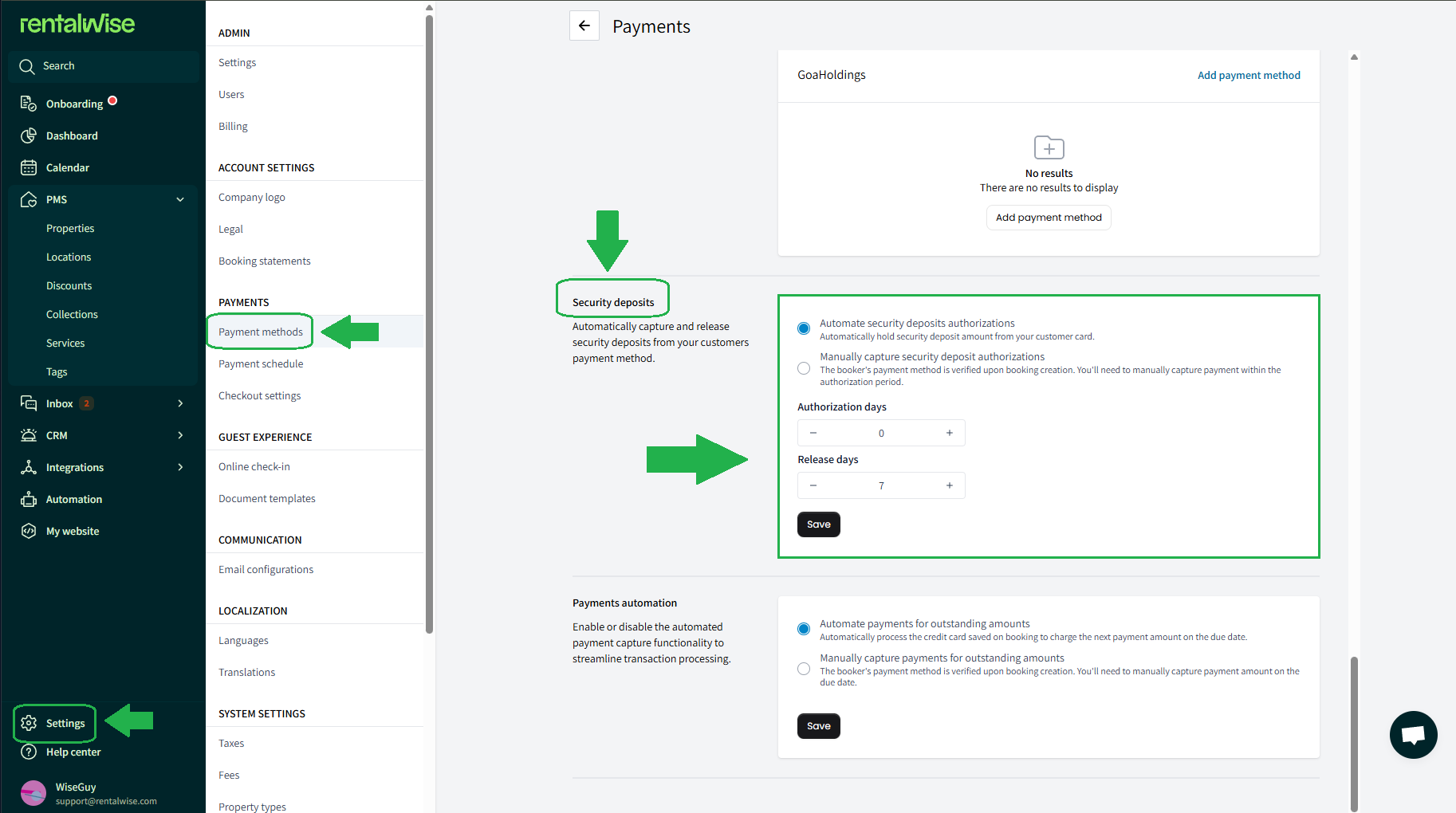
Navigate to Settings → Payment Methods → Security Deposits to choose whether:
The amount should be captured automatically, or
It requires manual authorization.
Editing the Security Deposit
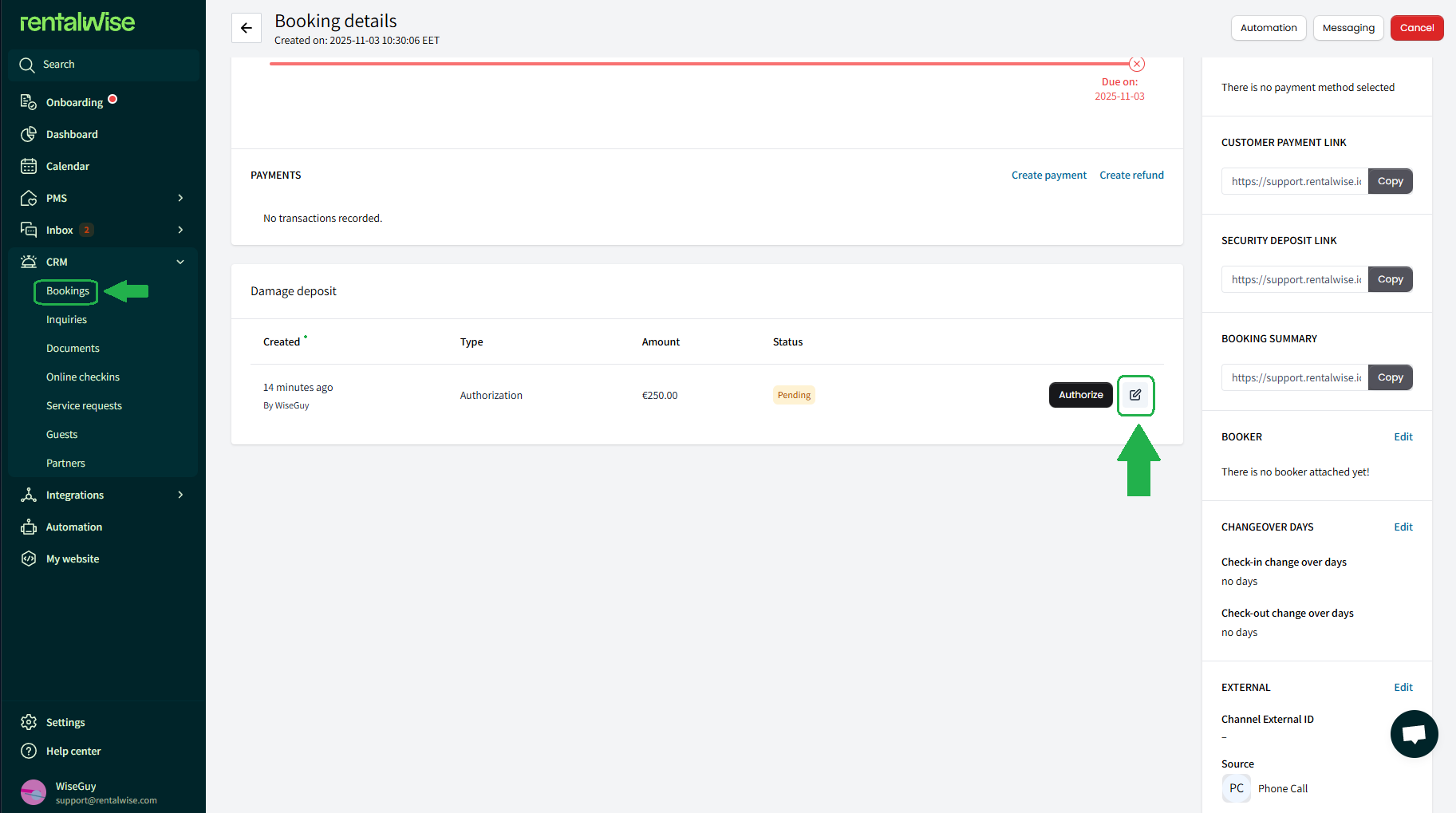
You can edit the amount only when the deposit status is “Pending” or “Failed.”
Once a deposit is Authorized, it can no longer be edited.
Authorization Timings
RentalWise makes its best effort to pre-authorize the guest’s credit card.
However, depending on the guest’s bank holding period, the pre-authorization may take longer than the booking duration.
Since pre-authorizations are not recurring payments, if the hold expires before check-in, you may need to send the Security Deposit link again for the guest to reauthorize it.
🔐 Understanding 3D Secure (3DS)
One of the most common challenges you may encounter is related to 3D Secure (3DS).
3DS is a security protocol that adds an extra verification layer for online card transactions by confirming the cardholder’s identity (often via SMS, banking app, or verification code).
While this improves transaction security, it can sometimes impact the pre-authorization flow. Here’s how:
In regions where 3DS is mandatory (e.g., Europe), the guest’s bank may require manual verification each time a hold is placed.
In countries like the USA and Australia, where 3DS is not commonly used, the process will be seamless.
💡 Impact:
Because a pre-authorization is a “hold” and not a payment, if the verification fails or the card issuer doesn’t support 3DS, the transaction will fail automatically.
Solution:
If this happens, simply resend the Security Deposit payment link to the guest and ask them to complete it manually on the spot. This ensures the authorization is processed directly through their bank’s secure environment.
⚠ Other Common Issues & How to Handle Them
Issue | Description | Recommended Action |
|---|---|---|
Insufficient Funds | The guest’s card does not have enough balance to cover the Security Deposit amount. | Inform the guest about the insufficient funds and ask them to use another card or transfer funds before retrying. |
Disposable / Virtual Cards | Some guests may use disposable or one-time-use virtual cards (common with OTA payments). Funds on these cards cannot be re-released after pre-authorization. | Advise the guest to contact their issuing bank directly, as these cards are not reusable and cannot be refunded through RentalWise. |
Hold Expired Before Arrival | The bank automatically releases the held amount after a set number of days. | Resend the Security Deposit link for the guest to complete a fresh pre-authorization. |
💬 In most cases, the error message explaining the issue will be displayed directly under the Security Deposit Status in the booking view.
Simply follow the message and take the appropriate action with the guest to resolve it quickly.
🧠 Tips & Best Practices
Always confirm that the Security Deposit settings match your property’s policies and channel requirements.
If you use multiple currencies or payment methods, ensure all Security Deposit configurations align with your preferred payment provider (e.g., Stripe, Redsys, etc.).
Consider automating your Security Deposit notifications using message templates for transparency and guest reassurance.
The authorization's currency is unique, therefore, the currency exchange you might need to do, has to be done afterwards from your connected Payment Provider
By properly configuring your Pre-Authorizations in RentalWise, you’ll safeguard your business from potential damages while maintaining a transparent, professional, and seamless payment experience for your guests.